

Core Data is awesome. One of the most awesome things about it is that you get free undo/redo. Of course, you wouldn’t actually ship anything but the simplest of applications with the undo Core Data provides, but getting it up to scratch it pretty simple — most of my additions in Clarus are simply putting certain operations into undo groups.
Clarus and Files
Clarus can store photos and other resources in documents, and achieves
this by using a document bundle. A class, called
KNBundledDocumentResourceManager, manages what’s going on:
- When you first add a resource to a document, the file you add is copied into what’s internally known as the transient resources directory. The location of this is an implementation detail, but current versions of Clarus use the current user’s temporary directory.
- If you then close the document without saving (or Revert back to the last saved version), the files still in the transient resources directory are simply cleared out.
- If, instead, you save the document, the files in the transient resources directory are moved into the document’s bundle.
- The model doesn’t know (or care) about all this, and just has the resource id of the file, asking the resource manager for the path whenever it’s needed.
The transient resources directory is used so we don’t fill up the document’s package with stuff until we’re absolutely sure the user wants it. This wouldn’t actually be so bad back in the day, since we could simply delete the file if it isn’t wanted later on, but now we have Spotlight and Time Machine indexing and backing up everything we do at the file level, it’s not so smart. Plus, we want the document’s package to be consistent with the saved state of the model at all times, just in case the file is copied out from under us.
Undo
For a piece about undo, I haven’t really mentioned undo much so far, have I? Well, that’s because in Clarus 1.0.x, undo and redo doesn’t quite work correctly. You can undo and redo adding and removing resources, but this doesn’t actually affect the underlying files! So, if you add a photo to your Clarus document in 1.0.x, pressing undo won’t remove the file from the resource manager and it’ll end up in your document’s package no matter what. A while back, I was listening to Matt Gemmell’s “World According to Gemmell” segment in the MDN show, and he was discussing how, basically, if you allow the user to make an unrecoverable mistake, you fail. I heartily agreed, and immediately added the following ticket into Clarus’ issue tracker:
Undoing adding/removing attachments and photos doesn’t work correctly
I’m happy to say that, almost exactly one month on from that ticket being created, it’s been marked as resolved and will be included in the Clarus 1.5 release in a couple of weeks. The implementation hasn’t been as simple as I’d like, partly because of bad approaches on my part, and partly because of a few… niggles in Cocoa that ended up frustrating me somewhat:
After four hours of tedious bullshit from Cocoa, you can now undo/redo adding and deleting attached files from your document in Clarus. –iKenndac (me), on Twitter
As an aside, Geoff Pado’s response to that cheered me up no end:
@iKenndac You mean *you* can now, unless you already pushed an update? :P –Arclite, on Twitter
Bad Approach 1
“I know,” I thought, “when you undo adding a photo, it’ll just remove it. Redoing will add the file again from its original location!” This is immediately a bad idea, since Clarus’ model is file ownership — once you add a file to a Clarus document, Clarus makes its own copy and you can trash the original file. Depending on you to not trash the file for undo and redo to work properly is a fairly stupid way to work.
Bad Approach 2
“Fine,” I thought, “when you undo adding a photo, it’ll move it to a new place, reserved for removed items. Redoing will use the existing mechanism of adding files, and the file will end up in the transient resources queue. The existing save mechanism will move the file back to the package on save.” Under many situations, this works fine. However, imagine the following sequence:
- User adds a photo, then saves the document. The document is marked clean, and the file is in the document’s bundle.
- The user hits undo. The file is moved to the removed resources directory, and the document is marked as dirty.
- The user hits redo. The file is moved to the transient resources directory, and the document is marked clean again.
The failing point is step 3. The document is clean, but the file isn’t in the bundle! Hitting Save again will put the file back into the bundle, but who hits Save on an unsaved document? At that point, the user can close the document without prompts and lose their file.
The Correct Approach
This is the approach Clarus 1.5 takes: Adding a photo works as in 1.0.x — the file is first put into a transient directory, then moved to the package upon save. When you remove a photo, either by undoing an add or removing it using the Clarus UI, the file is kept in the package, but is internally moved to a removed resources list. When you redo an add or undo a remove, the file is put back into the current resources list. Finally, when the user saves (or reverts), the resources in the “removed” list are moved out to the transient resources directory and put into the internal “transient removed resources” list, just in case we want them back later. Hooray! Integrity is preserved!
Implementation
The implementation is actually fairly simple, as long as you take into account a few niggles. There are three methods in Clarus for adding and removing photos. The first is called by whatever has the file path of the original file to be added:
-(void)addImageFromPath:(NSString *)path {

    NSString *resourceId = [[[self document] resourceManager] addResourceFromPath:path];

    [[[self document] undoManager] beginUndoGrouping];

    Photo *photo = [imageController newObject];
    [photo setResourceId:resourceId];
    [imageController addObject:photo];
    [photo setDelegate:[[self document] resourceManager]];

    [[[[self document] undoManager] prepareWithInvocationTarget:self] removePhoto:photo withResourceId:resourceId];
    [[[self document] undoManager] endUndoGrouping];
}
Fairly simple, right? This is what the code does:
- Adds the file to the resource manager. This copies the file to the right location and returns a resource id.
- Begins an undo grouping.
- Creates the photo object in the model, sets the resource id and delegate.
- Notifies the undo manager of how to undo this operation.
- Ends the undo grouping.
The removePhoto:withResourceId: method is simpler:
-(void)removePhoto:(Photo *)aPhoto withResourceId:(NSString *)resourceId {

    [[[self document] undoManager] beginUndoGrouping];

    [[[self document] resourceManager] removeResourceWithId:resourceId];
    [[aPhoto pet] removePhotosObject:aPhoto];

    [[[[self document] undoManager] prepareWithInvocationTarget:self] addPhoto:aPhoto withResourceId:resourceId];
    [[[self document] undoManager] endUndoGrouping];
}
Finally, addPhoto:withResourceId: is just as simple:
-(void)addPhoto:(Photo *)aPhoto withResourceId:(NSString *)resourceId {

    [[[self document] undoManager] beginUndoGrouping];

    [[aPhoto pet] addPhotosObject:aPhoto];

    [[[[self document] undoManager] prepareWithInvocationTarget:self] removePhoto:aPhoto withResourceId:resourceId];
    [[[self document] undoManager] endUndoGrouping];
}
Hopefully they’re simple enough to understand without spelling it out. Ideally, this is all we’d need to work properly, right? The resource manager automatically moves a removed resource back to the correct list (transient or current) when its path is requested.
Hiccup 1
Notice that I’m passing the photo’s resourceId around alongside the photo. This seems a bit pointless since resourceId is a property of photo, right? Well, we’re wrapping another layer around Core Data’s built-in undo management, which means we get called first. This is fine when undoing, but when redoing, we get called before Core Data gets a chance to rebuild all of the data correctly. So, while we do get the original photo instance on redo, all of it’s properties are nil. Therefore, we have to keep a separate reference to the resource id throughout the process.
Hiccup 2
This isn’t actually shown in the code here, but is an artefact of how
the resource manager works. The resource manager has an instance of
NSBundle representing the document, and used to get paths using
NSBundle’s pathForResource:ofType: method. However, it would appear
that NSBundle caches the contents of the bundle. As resources are moved
in an out of the resources directory, NSBundle gets out of sync pretty
quickly, and -pathForResource:ofType: can return nil even though the
file is most definitely, positively there. To solve this, I eventually
stopped using NSBundle’s methods at all. [[bundle resourcePath]
stringByAppendingPathComponent:fileName] works much better.
Visually
This approach really does require a separate controller to keep track of what goes where and when. Consider this diagram of what’s going on:
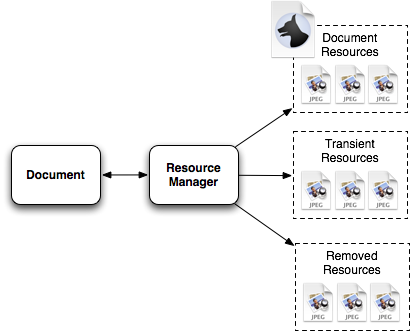
Where a resource actually is depends on four things:
- Whether the document has been saved since the resource was added.
- Whether the resource has been removed since it was added.
- Where the user is in the undo stack.
- Whether the document is “clean” or not.
Inherent Problems
My approach still has a couple of problems:
- Storing files in the user’s temporary directory is fine, but if the document is on a different disk, moving the files around may take a long time.
- ~~At the moment, the removed resources directory is also the user’s temporary directory, and files are moved there immediately when removed. This is actually wrong, since the package itself doesn’t represent the last saved state any more - if you were to copy the document at this moment, the copy would be broken as some resources would be missing.~~ The following has now been implemented: This can be fixed by simply not moving files around when they’re removed - only when the document is saved. This allows the document package to keep its integrity and allow undo past the last save.
Conclusion
Managing files and an undo stack while at the same time making sure the document on disk keeps its integrity is a pain in the ass. I think my approach is a good one, but if you disagree (or simply have another approach), please leave a comment. The resource manager class is over 400 lines long and contains a ton of state information about which file is where, where it came from and where it should go next. Relying on the original file being there would make this a lot simpler. So would allowing the document package to be inconsistent with the model itself some of the time — let’s face it, it’s not like it’s often a user would add a file then hit undo given the lifespan of the document. However, as Mike Lee said once (paraphrased): If you don’t do a feature properly, don’t do it at all.